
When working on a project in DaVinci Resolve I was hearing an annoying clipping / clicking / crackling sound on playback. The issue did not occur when I exported the project.
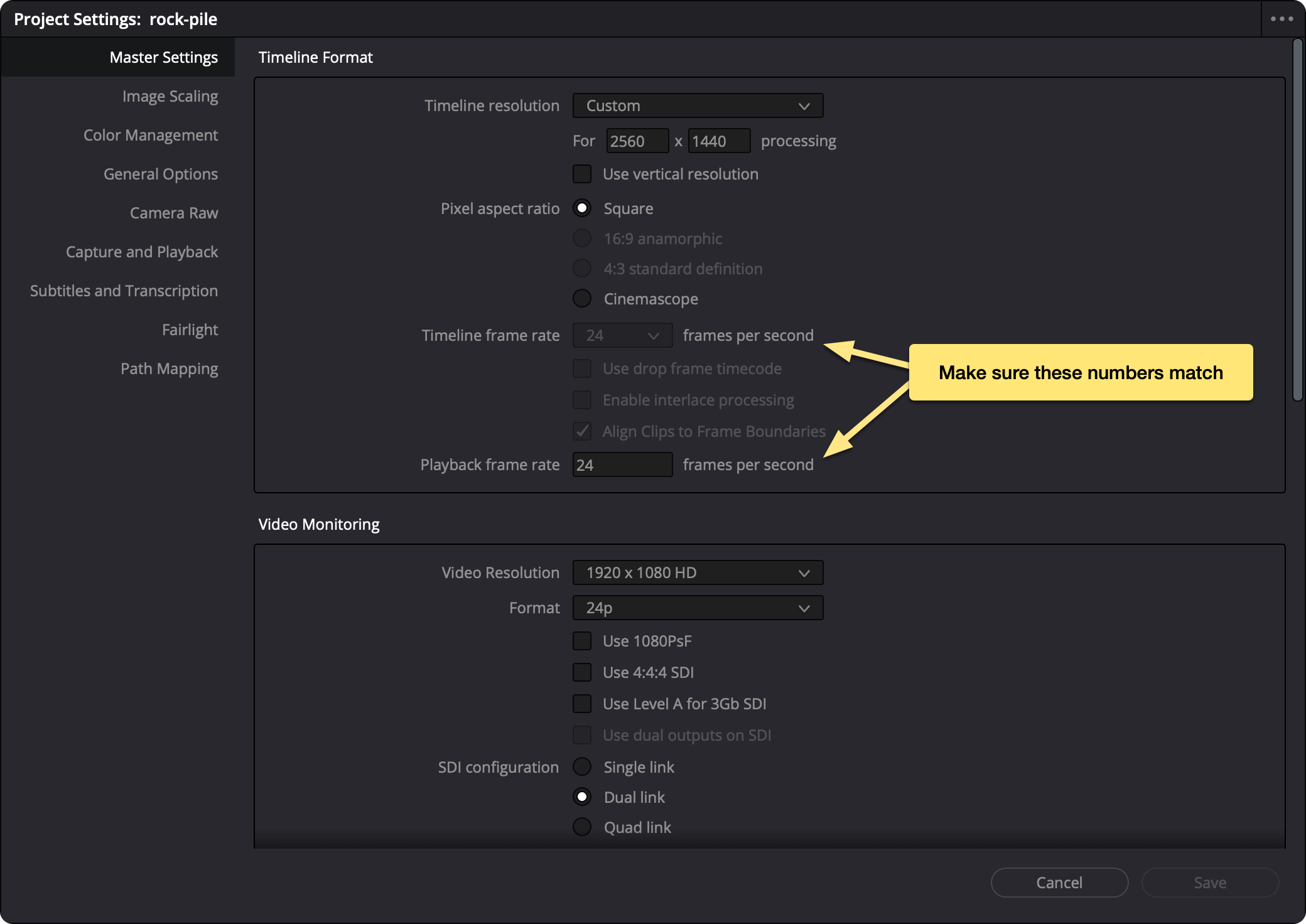
The underlying issue was a mismatched frame rate - my project configs were set to 24fps but the playback frame rate was set to 30 fps.
This guide shows how to fix this error and also covers other possible causes if a mismatched framerate is not your issue.
Actual audio clipping (levels too high)
Mismatched sample rates
Buffer size too low
System performance issues
Audio driver issues
Output volume too hot
Corrupted cache or render files
If you export the project and the distortion disappears in the rendered file, the issue is playback-related (frame rate, buffer, drivers, system load). If it’s still there in the export, it’s in the audio itself (levels, sample rate mismatch, or clipping baked into the file).
No subscriptions, no auto-renewals.
Just a simple one-time payment that helps support my free, to-the-point videos without sponsered ads.
Unlocking gets you access to the notes for this video plus all 200+ guides on this site.
Your support is appreciated. Thank you!
 Blur background for vertical videos in DaVinci Resolve
 How to Reduce Proxy File Size in DaVinci Resolve
 Dynamic Zoom in DaVinci Resolve