
In this guide, I’ll show you how to create a simple command-line script on macOS to quickly free up ports you commonly need during development.
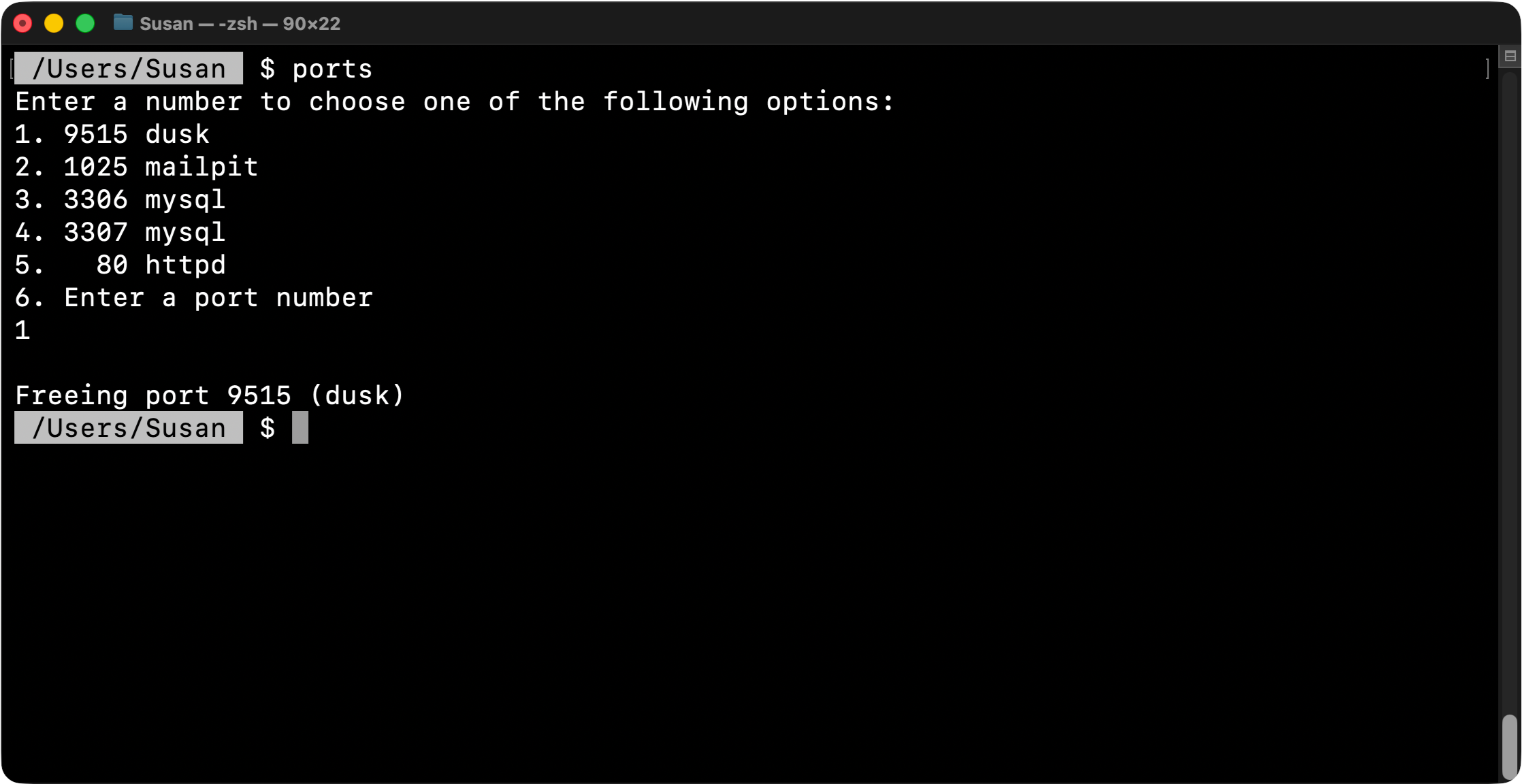
First, create a directory to store your script. For example, you can create a shortcuts folder inside your Documents directory:
> mkdir ~/Documents/shortcuts
Next, create a file called ports.sh in that directory and add the script contents (shown at the bottom of this guide). You can customize the script to target whichever ports you frequently need to free.
Once the file is created, make it executable:
> chmod +x ~/Documents/shortcuts/ports.sh
You can now run the script directly:
> ~/Documents/shortcuts/ports.sh
To make this even more convenient, you can create a shortcut using a shell alias.
Open your ~/.zshrc file and add the following line:
alias ports='~/Documents/shortcuts/ports.sh'
Save the file, then restart your terminal (or run source ~/.zshrc) to apply the changes.
After that, you can run your script from anywhere by simply typing:
ports
#!/bin/bash

# Kill any process currently listening on the provided TCP port.
free_port() {
    local port="$1"
    sudo lsof -ti:"$port" && sudo lsof -ti:"$port" | xargs sudo kill -9
}

# Show common local dev ports to free quickly.
echo "Enter a number to choose one of the following options:"
echo "1. 9515 dusk"
echo "2. 1025 mailpit"
echo "3. 3306 mysql"
echo "4. 3307 mysql"
echo "5.   80 httpd"
echo "6. Enter a port number"

# Read the selected menu option.
read -r choice

# Route the selected option to the corresponding port cleanup.
case $choice in
    1)
        echo ""
        echo "Freeing port 9515 (dusk)"
        free_port 9515
        ;;
    2)
        echo ""
        echo "Freeing port 1025 (mailpit)"
        free_port 1025
        ;;
    3)
        echo ""
        echo "Freeing port 3306 (mysql)"
        free_port 3306
        ;;
    4)
        echo ""
        echo "Freeing port 3307 (mysql)"
        free_port 3307
        ;;
    5)
        echo ""
        echo "Freeing port 80 (httpd)"
        free_port 80
        ;;
    6)
        echo ""
        echo "Enter the port number you want to free:"
        # Allow any custom port input at runtime.
        read -r port
        echo "Freeing port $port"
        free_port "$port"
        ;;
    *)
        echo "Invalid choice. Please enter a number between 1 and 8."
        ;;
esac
 Simplest command line program for Windows - Git Bash
 MySQL Command Line - Database and User Creation
 Simple Command Line Text Editing with Nano